A baki khata that writes itself from your sales
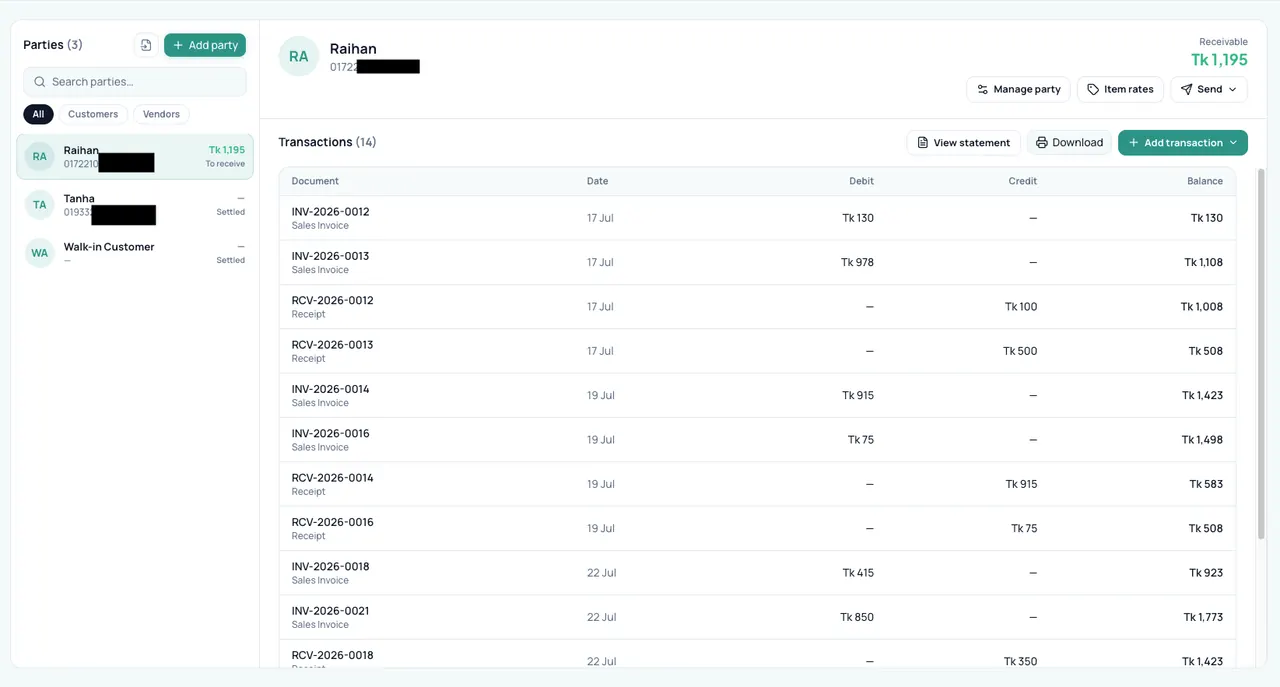
In a khata app you type the due in after the sale. In Bisnesy the credit sale is the due — it lands on the customer's ledger the moment you bill it, with the items, and every payment settles it oldest-first.
7 days free · no payment · we import your products
- Dues from sales
- Daily overdue list
- One-tap WhatsApp reminder
- Supplier dues too
How does Bisnesy manage customer dues?
Choose due (or part-pay) at checkout and the unpaid amount goes on that customer's ledger. Each morning Bisnesy alerts the owner to overdue invoices; from the customer's page you send a pre-written reminder with their exact balance on WhatsApp in one tap, or by SMS from your plan's SMS allowance. Payments settle the oldest bills first, and receivables ageing shows how long each due has been open.
Why baki goes uncollected
Dues are written after the fact, in a different place from the sale, and nobody is reminded when they're overdue. By the time the owner goes through the khata, the customer disputes the amount — and there's no invoice to show.
From credit sale to collection
- 1
Sell on due
Full or part — the rest goes to their ledger.
- 2
See who's overdue
Daily alert + receivables ageing.
- 3
Remind in one tap
WhatsApp or SMS with the exact balance.
- 4
Collect
Payment settles oldest bills first.
- 5
Send a statement
PDF with every bill and payment.
Every customer's account in one place
Balance, bills, payments and statement on one page — for suppliers too.
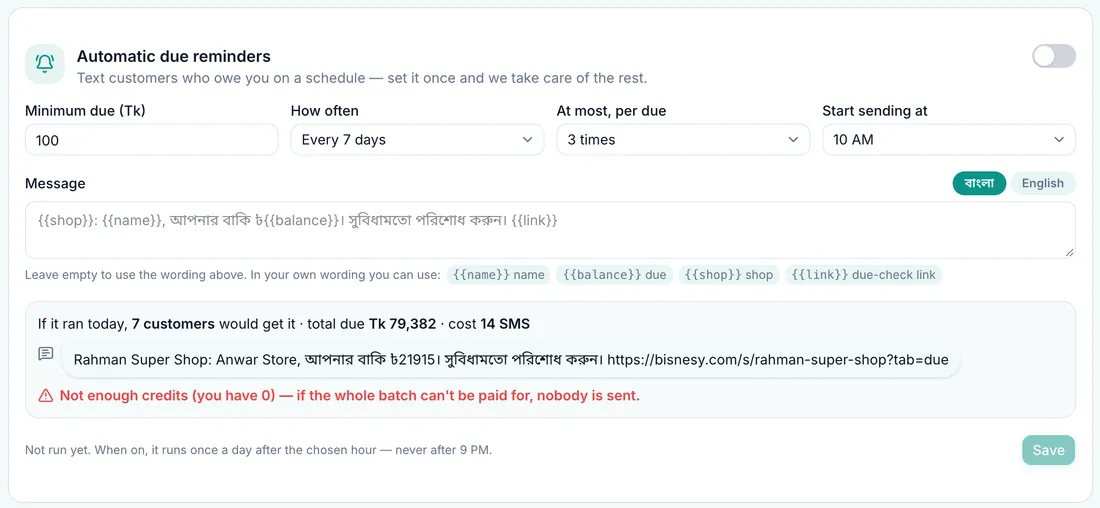
A reminder they can't argue with
The message carries the exact balance from the ledger, and a statement can follow as a PDF.
Built for
- Grocery shops
- Wholesalers
- Pharmacies
- Hardware stores
What Bisnesy doesn't do
Worth knowing before you choose.
- WhatsApp reminders are sent by you in one tap — they are not sent automatically to customers.
- SMS uses your plan's monthly allowance, then paid credits.
Run a shop like yours before you decide
Open a demo shop that is already full of products, customers and dues. Make a sale, give credit, take a payment and watch the stock and the profit change. It is your own copy, and nothing you do in it can go wrong.
- Grocery
- Pharmacy
- Wholesale
- Clothing
- Footwear
- Mobile & electronics
- Hardware
- Online seller
- Agro inputs
Switch to Bisnesy without starting your business from zero
7 days of every Pro feature, and we set it up with you: your products imported, your opening stock and dues entered, a setup call in Bangla. No payment, no setup fee, and a 30-day money-back guarantee when you pay.
Setup requests go straight to our team in Dhaka on WhatsApp.
7 days of every Pro feature
POS, stock, accounting, HR and every report unlocked. No payment, nothing to install.
We import your products
Send your list on WhatsApp: an Excel file, an export from your old software, or a photo of your register. We load it for you.
We enter your opening stock & dues
Your current stock and what customers and suppliers owe, entered for you, so day one already looks like your shop.
A free setup call in Bangla
One call with our team to set up your invoice, staff and payment accounts and bill your first sale together.
30-day money-back guarantee, no questions asked
Tell us within 30 days of your first payment that it isn't working for you, and we refund it in full. No questions, no forms.
No setup fee, ever
Many business-software vendors charge a setup or licence fee up front. We don't. You pay only the plan, from ৳499 a month.
What happens if you start today
- 1Today
Open an account in two minutes. No payment, no payment.
- 2Day one
Send your product list on WhatsApp and we load it. We bill your first sale together.
- 37 days
Run every Pro feature in your own shop, no strings.
- 4Then
Pick a plan if it works for you. Not working within 30 days? Full refund, no questions asked.
Every day on paper is a day of dues and missing stock you never get back. Start today and tomorrow the whole picture is yours.
Money-back guarantee: within 30 days of your first payment, tell us Bisnesy isn't working for you and we refund that payment in full within 5 working days. No questions asked. One refund per account.
Questions people ask
Are reminders sent automatically?
The owner gets automatic daily alerts about overdue invoices. The reminder to the customer is sent by you in one tap on WhatsApp, or by SMS.
Can I track what I owe suppliers?
Yes. Supplier dues work the same way from purchases.
Can a customer pay part of a bill?
Yes. Part payments are allocated to the oldest open bills first.
Keep reading
Try it on today's sales.
Create your account, add a handful of products and bill your next customer through Bisnesy. Seven days free, no payment, cancel any time.