POS software in Bangladesh: what to look for, and how Bisnesy does it
A point-of-sale system here has to survive load-shedding, take cash, bKash and credit on the same counter, speak Bangla, and turn every sale into stock and accounts you can trust. This page walks through each of those, with the screens.
7 days free · no payment · we import your products
- Bills offline
- Cash, bKash, Nagad & due
- Bangla + English
- From ৳499/month
What is the best way to choose POS software in Bangladesh?
Check five things: that billing keeps working when the internet drops; that it records cash, bank, bKash, Nagad and credit (due) sales separately; that stock updates with every sale and purchase; that sales post to real accounts so you can see profit; and what it costs over a year including setup. Bisnesy does all five, runs in any browser in Bangla or English, has no setup fee and starts at ৳499 a month with a 7-day free trial.
Why a cash register or a khata app stops being enough
A shop usually starts with a notebook, then a khata app for dues, then a spreadsheet for stock. Each is fine alone. Together they never agree: the khata says one thing about a customer, the spreadsheet another about stock, and the cash box a third about the day.
A POS joins them. One sale at the counter should reduce stock, record how it was paid, put any unpaid part on the customer's account and post to the books — once, automatically. That is the test to hold any POS software to.
What one sale does in Bisnesy
- 1
Scan or search
Barcode scanner, phone camera or search by name.
- 2
Take payment
Cash, bank, card, bKash, Nagad, or due — or a split.
- 3
Print or share
Thermal receipt, A4 invoice, or a link on WhatsApp.
- 4
Stock moves
Quantity comes off the shelf, in the unit sold.
- 5
Dues update
Any unpaid part lands on the customer's ledger.
- 6
Books post
A balanced journal entry — profit is live.
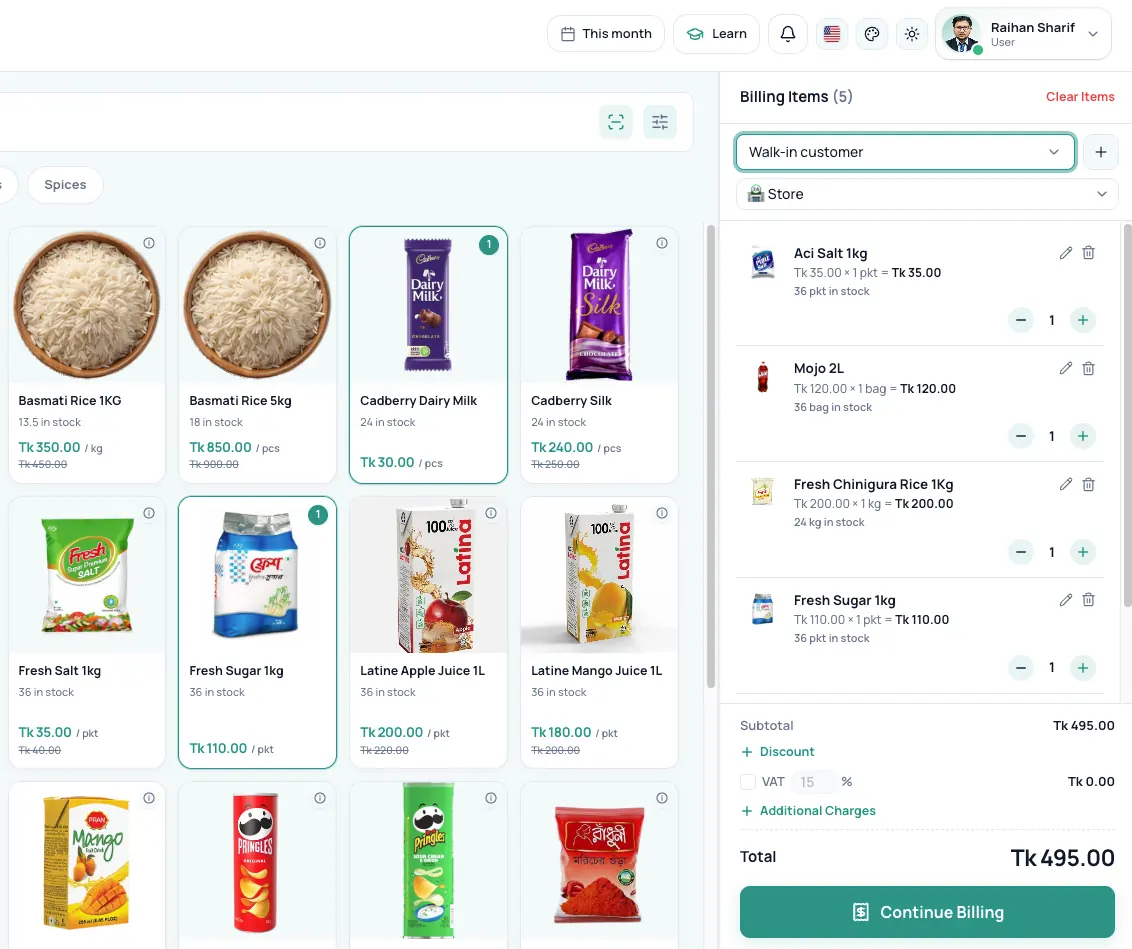
1. It must bill when the internet doesn't
In Bisnesy the POS keeps working offline. Each sale is saved on the device with a unique reference and sent when the connection returns; if the reply is lost on the way, the server recognises the reference and never posts the sale twice.
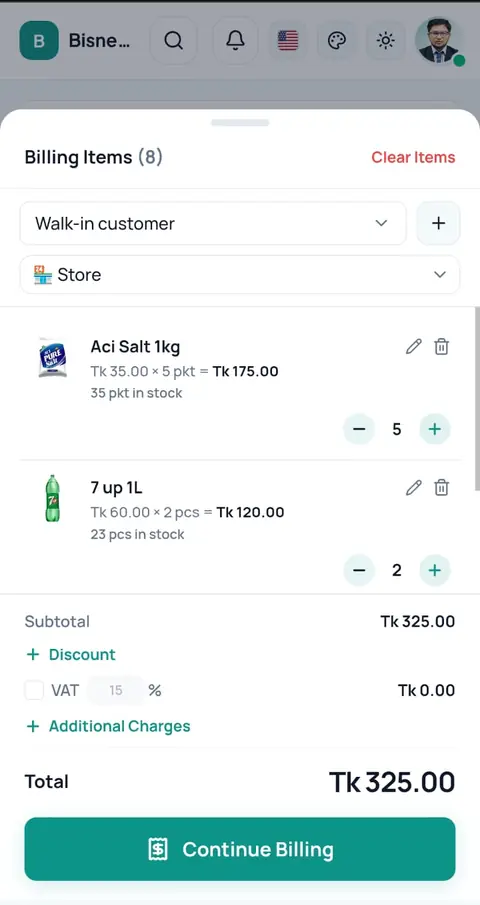
2. Cash, bKash, Nagad and baki — kept apart
Every way of being paid is its own money account, so at closing you know what is in the drawer, what is in each wallet and what is still owed. A bill can be split between them.
- Cash, bank, card, bKash, Nagad or any account you add
- Due (credit) sales go to the customer's ledger
- Change and settled dues handled at the counter
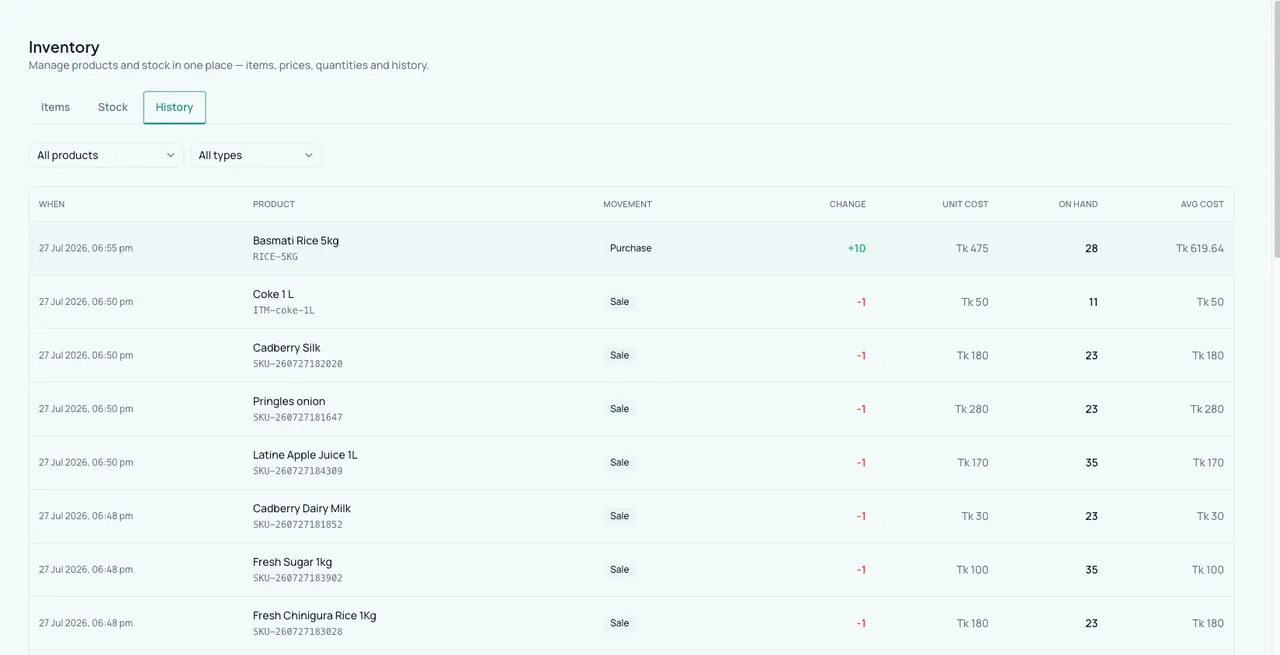
3. Stock that follows every sale and purchase
Purchases raise stock at a moving average cost, sales and returns move it, and corrections are recorded with a reason. Low-stock alerts arrive each day, and several branches or godowns can be tracked separately.
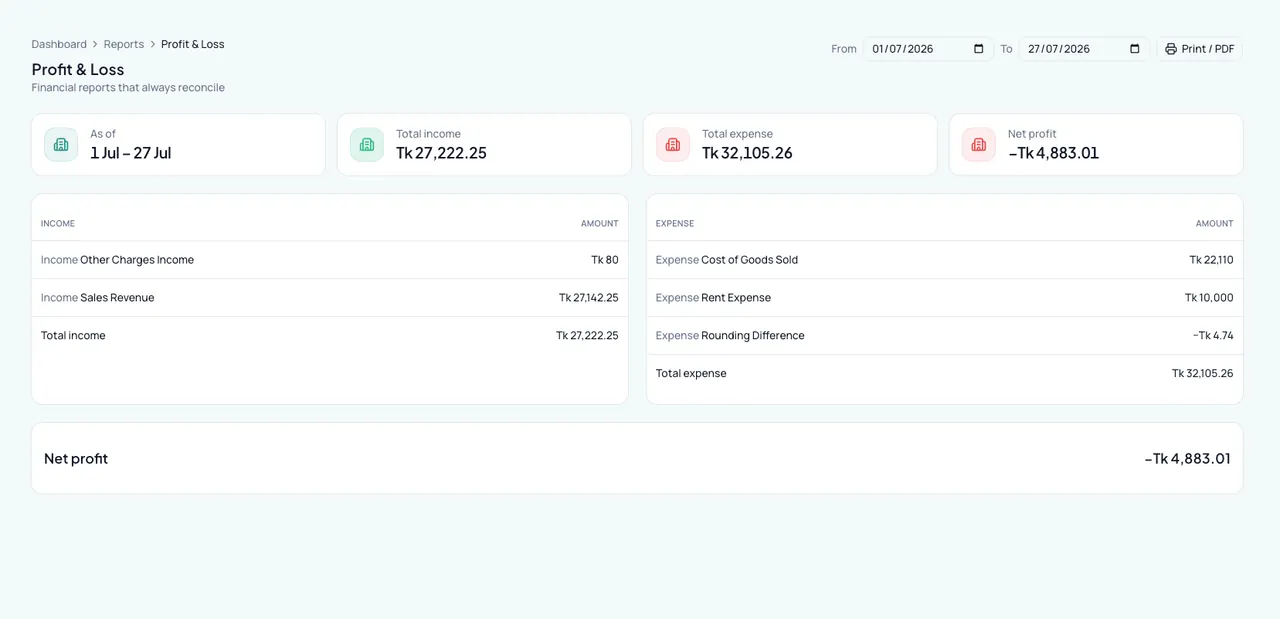
4. Accounts you don't have to keep
Sales, purchases, expenses and payments post double-entry journals by themselves: profit & loss, balance sheet, trial balance, cash flow and a VAT summary are always current.
5. What it costs — all of it
POS software in Bangladesh is sold three ways: one-time desktop licences, monthly cloud subscriptions, and ERPs with a setup fee on top. Ask for the total over a year. Bisnesy has no setup fee: Starter is ৳499 a month, Growth ৳999, Pro ৳1,499 and Enterprise ৳5,000 (up to 15 shops), with lower monthly prices when you pay for 3, 6 or 12 months. If you would rather pay once, Bisnesy Desktop is sold as a one-time licence.
- No setup fee; the monthly plan needs no per-computer licence
- Staff and devices included (3, 6 or 10 devices by plan)
- 30-day money-back guarantee on your first payment
Built for
- Grocery & super shops
- Pharmacies
- Fashion & cosmetics
- Hardware & electronics
- Wholesale
- Restaurants (counter service)
What Bisnesy doesn't do
Worth knowing before you choose.
- Card and bKash payments are recorded, not processed — you still use your card machine or wallet.
- It does not file VAT returns with NBR; it gives you the VAT summary to file.
- It doesn't connect to weighing scales or cash drawers directly.
- Restaurants needing kitchen tickets (KOT) and table management need a dedicated restaurant POS.
Run a shop like yours before you decide
Open a demo shop that is already full of products, customers and dues. Make a sale, give credit, take a payment and watch the stock and the profit change. It is your own copy, and nothing you do in it can go wrong.
- Grocery
- Pharmacy
- Wholesale
- Clothing
- Footwear
- Mobile & electronics
- Hardware
- Online seller
- Agro inputs
Switch to Bisnesy without starting your business from zero
7 days of every Pro feature, and we set it up with you: your products imported, your opening stock and dues entered, a setup call in Bangla. No payment, no setup fee, and a 30-day money-back guarantee when you pay.
Setup requests go straight to our team in Dhaka on WhatsApp.
7 days of every Pro feature
POS, stock, accounting, HR and every report unlocked. No payment, nothing to install.
We import your products
Send your list on WhatsApp: an Excel file, an export from your old software, or a photo of your register. We load it for you.
We enter your opening stock & dues
Your current stock and what customers and suppliers owe, entered for you, so day one already looks like your shop.
A free setup call in Bangla
One call with our team to set up your invoice, staff and payment accounts and bill your first sale together.
30-day money-back guarantee, no questions asked
Tell us within 30 days of your first payment that it isn't working for you, and we refund it in full. No questions, no forms.
No setup fee, ever
Many business-software vendors charge a setup or licence fee up front. We don't. You pay only the plan, from ৳499 a month.
What happens if you start today
- 1Today
Open an account in two minutes. No payment, no payment.
- 2Day one
Send your product list on WhatsApp and we load it. We bill your first sale together.
- 37 days
Run every Pro feature in your own shop, no strings.
- 4Then
Pick a plan if it works for you. Not working within 30 days? Full refund, no questions asked.
Every day on paper is a day of dues and missing stock you never get back. Start today and tomorrow the whole picture is yours.
Money-back guarantee: within 30 days of your first payment, tell us Bisnesy isn't working for you and we refund that payment in full within 5 working days. No questions asked. One refund per account.
Questions people ask
Does Bisnesy POS work without internet?
Yes. Billing continues offline and each sale syncs when the connection returns, with protection against double-posting.
Which printers work?
Thermal receipt printers and normal A4 printers through the browser's print dialog. Invoices can also be shared as a link or PDF.
Can I use it on a phone?
Yes. It runs in any modern browser on Android or iPhone and can be installed to the home screen like an app.
How much does POS software cost in Bangladesh?
It varies widely: desktop licences are often a one-time fee in the tens of thousands of taka, and cloud ERPs often add a setup fee. Bisnesy is ৳499 to ৳1,499 a month for one shop's plans and ৳5,000 for Enterprise (up to 15 shops), with no setup fee. Bisnesy Desktop is also sold as a one-time licence.
Can I try it before paying?
Yes — 7 days with every feature, no payment. We'll also import your products for you if you send us your list.
Keep reading
Try it on today's sales.
Create your account, add a handful of products and bill your next customer through Bisnesy. Seven days free, no payment, cancel any time.