Inventory management that matches your shelf
Stock is only useful if it's true. In Bisnesy every sale, purchase, return and correction moves it, every correction has a reason, and every godown keeps its own count.
7 days free · no payment · we import your products
- Live stock
- Low-stock alerts
- Batch · expiry · variants
- Several godowns
What makes inventory software accurate?
Stock should change only through recorded events — purchases, sales, returns, transfers and adjustments with a reason — and each should update value as well as quantity. Bisnesy works this way: purchases set a moving average cost, sales and returns move quantity in the unit used, and damage, theft and expiry are separate adjustments that each post to their own loss account.
Where stock counts go wrong
A carton bought and pieces sold; a return put back on the shelf but not in the book; a damaged item quietly thrown away. Each is small. Over a month they are the difference between the stock you think you have and the stock you do.
Stock's full life in Bisnesy
- 1
Purchase
Stock and average cost go up; supplier due is tracked.
- 2
Sell
Quantity comes off in the unit sold.
- 3
Return
It goes back exactly as it left.
- 4
Transfer
Between godowns, recorded on both sides.
- 5
Adjust
Damage, theft, expiry or count correction — with a reason.
History for every product
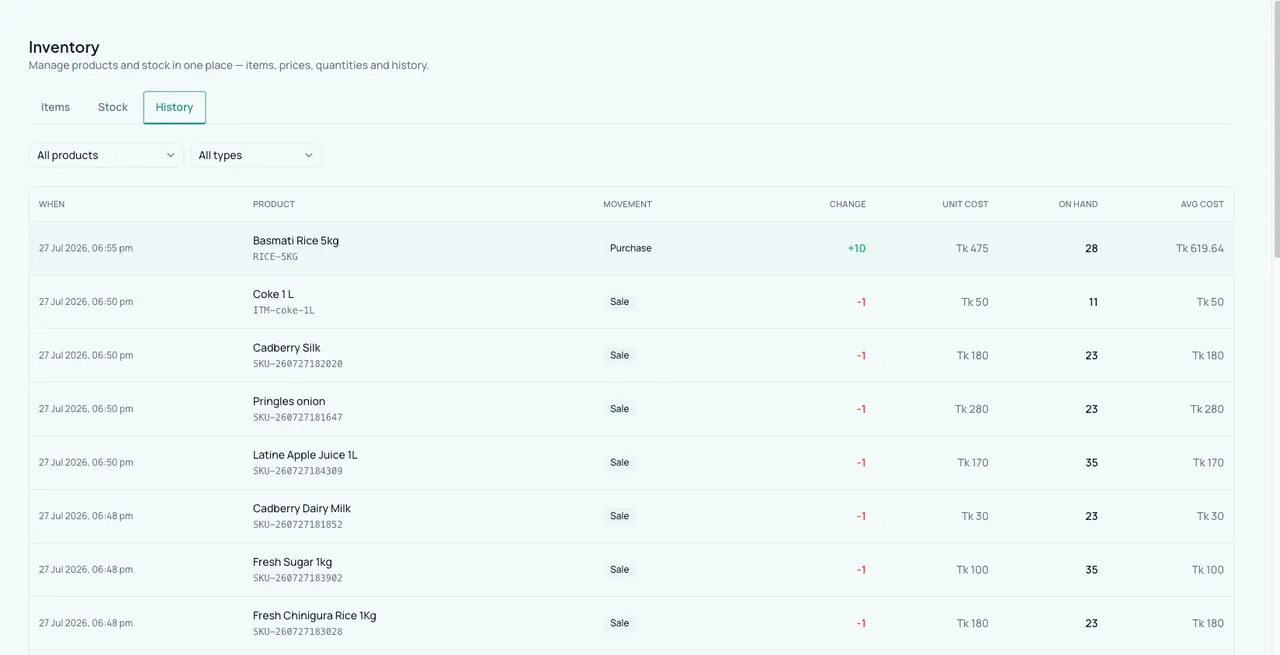
Open a product and see every movement that made its current stock: who, when, why and at what cost.
Alerts before you run out
Set a reorder level per product; the daily alert lists everything below it, on the dashboard and as a push notification.
Barcodes, labels and scanning
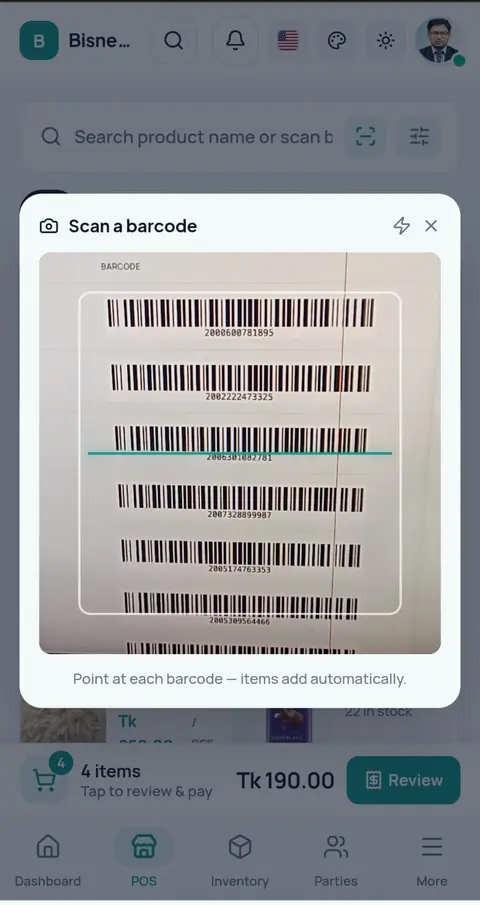
Generate barcodes, print label sheets and count stock with a phone camera.
Built for
- Retail shops
- Wholesalers
- Pharmacies
- Multi-branch businesses
What Bisnesy doesn't do
Worth knowing before you choose.
- No manufacturing or bill-of-materials.
- No automatic purchase orders — alerts tell you what to order.
Run a shop like yours before you decide
Open a demo shop that is already full of products, customers and dues. Make a sale, give credit, take a payment and watch the stock and the profit change. It is your own copy, and nothing you do in it can go wrong.
- Grocery
- Pharmacy
- Wholesale
- Clothing
- Footwear
- Mobile & electronics
- Hardware
- Online seller
- Agro inputs
Switch to Bisnesy without starting your business from zero
7 days of every Pro feature, and we set it up with you: your products imported, your opening stock and dues entered, a setup call in Bangla. No payment, no setup fee, and a 30-day money-back guarantee when you pay.
Setup requests go straight to our team in Dhaka on WhatsApp.
7 days of every Pro feature
POS, stock, accounting, HR and every report unlocked. No payment, nothing to install.
We import your products
Send your list on WhatsApp: an Excel file, an export from your old software, or a photo of your register. We load it for you.
We enter your opening stock & dues
Your current stock and what customers and suppliers owe, entered for you, so day one already looks like your shop.
A free setup call in Bangla
One call with our team to set up your invoice, staff and payment accounts and bill your first sale together.
30-day money-back guarantee, no questions asked
Tell us within 30 days of your first payment that it isn't working for you, and we refund it in full. No questions, no forms.
No setup fee, ever
Many business-software vendors charge a setup or licence fee up front. We don't. You pay only the plan, from ৳499 a month.
What happens if you start today
- 1Today
Open an account in two minutes. No payment, no payment.
- 2Day one
Send your product list on WhatsApp and we load it. We bill your first sale together.
- 37 days
Run every Pro feature in your own shop, no strings.
- 4Then
Pick a plan if it works for you. Not working within 30 days? Full refund, no questions asked.
Every day on paper is a day of dues and missing stock you never get back. Start today and tomorrow the whole picture is yours.
Money-back guarantee: within 30 days of your first payment, tell us Bisnesy isn't working for you and we refund that payment in full within 5 working days. No questions asked. One refund per account.
Questions people ask
Can I buy in one unit and sell in another?
Yes. Set the conversion per product (e.g. 1 carton = 24 pieces) and stock stays correct in both.
Does it support several warehouses?
Yes. Stock is kept per warehouse and moved with transfers.
How is stock valued?
At moving average cost from your purchases.
Keep reading
Try it on today's sales.
Create your account, add a handful of products and bill your next customer through Bisnesy. Seven days free, no payment, cancel any time.