Books that are always right
Every sale, purchase, payment and expense posts itself to double-entry books. The trial balance always balances, and every report reads from the same ledger, so the numbers agree with each other.
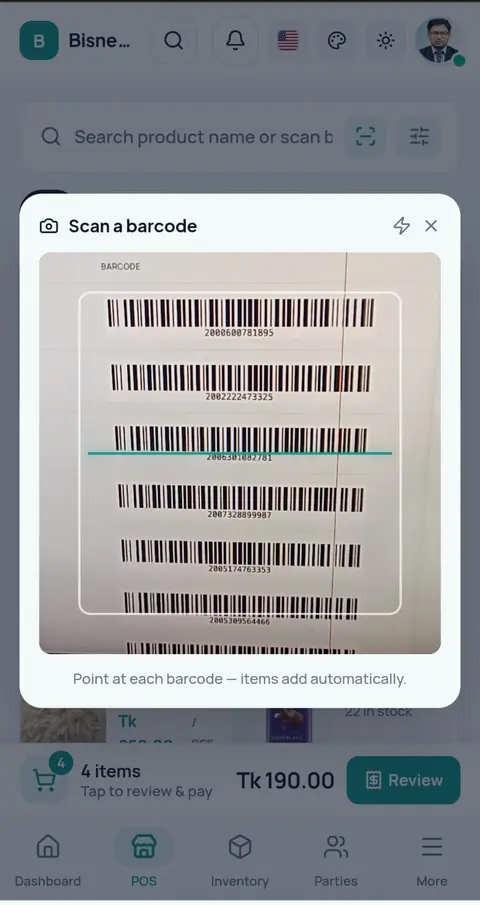
Scan-and-go billing on several counters, barcode labels for loose items, expiry control on dairy and packaged food, and permissions so a cashier can bill without seeing your costs.
7 days free · no payment · we import your products
Yes. Each counter logs in on its own device and bills from the same live stock. The Super Shop preset turns on batch, expiry and weight-based items; barcodes can be generated and printed as label sheets; and each cashier's role controls what they can see and do.
A departmental store lives or dies on counter speed and shrinkage. Queues form when billing is slow, stock disappears between the godown and the shelf, and dairy expires before anyone notices.
Queue at the till
The cashier types prices from memory, the line grows, and wrong prices go out on busy evenings.
?Items without barcodes
Loose and local products have no barcode, so they are the ones mispriced every day.
?Shrinkage
Stock quietly disappears and nobody can say if it was damage, theft or a billing mistake.
?Cashiers
Everyone who touches the till can see everything and change anything.
?Queue at the till
Scan a barcode and the right price is on the bill; several counters bill from the same live stock.
Items without barcodes
Print your own label sheets, so everything on the shelf scans.
Shrinkage
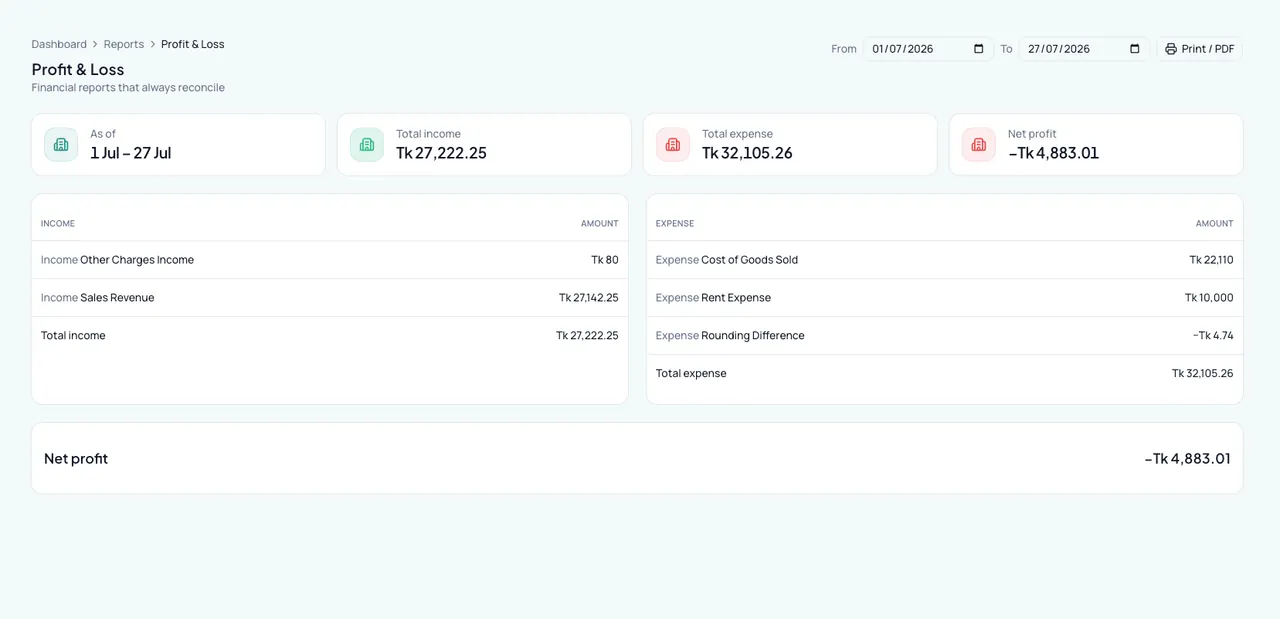
Count, correct and record the reason; damage, theft and expiry each show as their own loss in profit & loss.
Cashiers
Each staff account sees only what its role allows, and the owner can sign any device out instantly.
Keeping it in the khata: The cashier types prices from memory, the line grows, and wrong prices go out on busy evenings.
With Bisnesy: Scan a barcode and the right price is on the bill; several counters bill from the same live stock.
Keeping it in the khata: Loose and local products have no barcode, so they are the ones mispriced every day.
With Bisnesy: Print your own label sheets, so everything on the shelf scans.
Keeping it in the khata: Stock quietly disappears and nobody can say if it was damage, theft or a billing mistake.
With Bisnesy: Count, correct and record the reason; damage, theft and expiry each show as their own loss in profit & loss.
Keeping it in the khata: Everyone who touches the till can see everything and change anything.
With Bisnesy: Each staff account sees only what its role allows, and the owner can sign any device out instantly.
Shorter queues, the right price on every bill, and losses you can see and name instead of losses you only suspect.
See it in your own shop, 7 days freeEvery sale, purchase, payment and expense posts itself to double-entry books. The trial balance always balances, and every report reads from the same ledger, so the numbers agree with each other.
Each staff member signs in with their own login and only sees what you allow. Every change is logged with who made it and when. Download any report or list as PDF or Excel whenever you like.
Bangla from the first screen. Tap a product or scan with the phone camera, and the bill is done. The till is shown to you step by step on the first day.
The till keeps billing offline and syncs later, without ever posting a sale twice. Works on the phone, tablet and PC you already have.
| Khata | Excel | Bisnesy | |
|---|---|---|---|
| Stock goes down with every sale | Only by hand | ||
| Each customer's baki, with one-tap reminder | Only by hand | Only by hand | |
| Profit & loss without an accountant | Only by hand | ||
| Bill on a phone, even offline | |||
| Staff can't see what they shouldn't | |||
| Set up for you, free |
Bulk-import products from a spreadsheet — or send it to us and we import it.
Generate barcodes for items without one and print label sheets.
Each cashier signs in on their own device with their own role.
Scan, take cash, card or mobile money, print the receipt.
Record damage, theft or expiry as stock adjustments with a reason.
Pick your business type when you create your shop and Bisnesy switches these on and seeds these units for you. Everything stays editable in Settings — turn a feature on or off, rename a unit or add your own.
Default unit on a new product: Piece
A product can be bought in one unit and sold in another (a carton bought, pieces sold; a strip bought, tablets sold) — set the conversion once per product and stock stays correct in both.
Use the manufacturer's barcode where there is one, generate your own where there isn't, and print them in bulk on label sheets. A phone camera scans too, so a stock count needs no extra hardware.
Every stock correction is recorded with its reason — damage, theft, expiry — and each posts to its own loss account, so the profit & loss shows exactly how much walked out of the door.
Every super shop business on Bisnesy gets the same intelligence layer: a dashboard that briefs you daily, forecasts with stated accuracy, and per-product answers. No add-on to buy.
31 tools and 41 reports, set up for this trade when you create your shop. Anything not on every plan says which plan it starts from, so there are no surprises after you pay.
Bill on a phone, tablet or PC, in cash, bKash, Nagad, bank or due. Keeps billing without internet.
Generate, print and scan barcodes, including with a phone camera.
Print whole sheets of price labels for many products at once.
Sell several items as one; each part comes off stock.
A regular or wholesale customer gets their own price automatically.
Make discount codes and see how many were used and what they cost.
Units, variants, batches and serials, set the way your trade needs them.
Stock moves with every sale, purchase and return; counts and write-offs keep it honest.
Supplier bills at the real average cost, returns, and what you owe each supplier.
Stock per location, with transfers between them.
Bring products and customers in from a spreadsheet in one go.
Money in and out against bills, oldest first, across cash, bank and mobile wallets.
Rent, bills, salaries and the daily bazar, by category, into profit & loss.
Income that isn't a sale, recorded where it belongs.
Sales, purchases, payments and expenses, newest first, searchable.
Journals post themselves from your daily work; an accountant can read the books.
Owner's capital, bank or NGO loans with instalments, and fixed assets.
Every customer and supplier with their own ledger, ageing and statement.
Daily alerts to the owner for overdue dues, low stock, expiring batches and loan instalments.
Balance reminders and offers sent straight to customers' phones by SMS.
Regulars earn points on what they buy and use them later.
Monthly salaries, advances and payslips, into the same books.
Who came in, who is on leave, and the month's attendance per person.
A target per salesperson and how far along they are this month.
A public page with your products, live price and real stock. Customers add to a bag, pick a size or a combo, apply a coupon code and send the order — no app to install.
Every printed bill carries a QR that opens the verified bill on the customer's phone, and pages to check a due by mobile number or a warranty by serial / IMEI.
Import a courier's parcel list and it becomes real orders with addresses and amounts, then track delivered, returned and cancelled against the same customers and stock.
Book the parcel straight from the sale, check the customer's delivery record before you ship, and watch the status update by itself.
Every bill is tagged with where it came from — counter, your online shop, Facebook, WhatsApp — and a report compares them.
Remove a product photo's background with AI, compress and crop it, in the browser.
Social media posts and visiting cards from ready templates.
Worth knowing before you choose.
Open a demo shop that is already full of products, customers and dues. Make a sale, give credit, take a payment and watch the stock and the profit change. It is your own copy, and nothing you do in it can go wrong.
You don't need a setup call or a training day (we'll do a call free if you'd like one). Bisnesy walks a new shop through its first products and its first sale — on the real till, with real stock and real books.
Sign up, name your shop and pick its type. Units, accounts and tax are set up the right way for it.
Tap common items or type your own — just the name, the price and how many you have. Stock and its value go in with them.
The till shows you exactly where to tap. Stock comes down, the money lands in cash or bKash, and profit updates by itself.
7 days of every Pro feature, and we set it up with you: your products imported, your opening stock and dues entered, a setup call in Bangla. No payment, no setup fee, and a 30-day money-back guarantee when you pay.
Setup requests go straight to our team in Dhaka on WhatsApp.
POS, stock, accounting, HR and every report unlocked. No payment, nothing to install.
Send your list on WhatsApp: an Excel file, an export from your old software, or a photo of your register. We load it for you.
Your current stock and what customers and suppliers owe, entered for you, so day one already looks like your shop.
One call with our team to set up your invoice, staff and payment accounts and bill your first sale together.
Tell us within 30 days of your first payment that it isn't working for you, and we refund it in full. No questions, no forms.
Many business-software vendors charge a setup or licence fee up front. We don't. You pay only the plan, from ৳499 a month.
Open an account in two minutes. No payment, no payment.
Send your product list on WhatsApp and we load it. We bill your first sale together.
Run every Pro feature in your own shop, no strings.
Pick a plan if it works for you. Not working within 30 days? Full refund, no questions asked.
Every day on paper is a day of dues and missing stock you never get back. Start today and tomorrow the whole picture is yours.
Money-back guarantee: within 30 days of your first payment, tell us Bisnesy isn't working for you and we refund that payment in full within 5 working days. No questions asked. One refund per account.
As many as your plan's device limit: 3 on Starter, 6 on Growth, 10 on Pro.
Yes, from a spreadsheet. Or send it to us on WhatsApp and our team imports it for you, free.
Yes. Membership and reward points are available on plans that include them.
Yes, and we do it for you, free. Send your product list on WhatsApp (an Excel file, an export from your old software, or a photo of your register) and we load it. We also enter what customers and suppliers owe and your current stock, so day one already looks like your shop.
No. The POS keeps billing when the internet drops. Sales are kept on the phone or PC and sync by themselves when the connection returns, and a sale is never posted twice.
Yes. Switch it on in Settings and your business gets a public shop page showing your products, real prices, live stock and your variants or combos. The customer adds items to a bag, applies a coupon code, leaves a delivery address and sends the order — no app to install, just a phone browser. The order lands in your app as new, and you move it through confirmed, processing, out for delivery and completed (or cancel it), adding a delivery charge or a discount when you need to, then turn it into a quotation and a sale like any other order. You can also list the shop in the public directory on bisnesy.com, so new customers can find you.
Yes, and they need nothing installed. Every printed bill carries a QR that opens that verified bill on their phone, and you can switch on a due-check page (by mobile number) and a warranty-check page (by serial / IMEI or mobile number). They are web pages, so they work on any phone, and you decide whether to turn each one on.
With F-Commerce you import the courier's parcel or parcel-list file and it becomes real orders — customer, delivery address, amount and the courier's own consignment number — with stock coming off as it should. The courier's status updates then give you delivery analytics: delivered, returned and cancelled, against the same customers you already have. Delivery cost and commission post into your books like any other cost.
Yes. The dashboard carries a next-3-months sales forecast and a next-days cashflow projection, each with a stated accuracy. Tap any product for its stock equation, profit, monthly demand and a reorder suggestion. Buyer behaviour — who carries the shop, who owes, who went quiet — arrives in a daily brief. Nothing extra to buy for your super shop business.
Every feature is open for the first 7 days, and nothing to pay. Run it in your own shop, see what you use, then choose. The list above says which plan each feature starts from, so there are no surprises after you pay. And if it isn't working within 30 days of your first payment, you get that payment back in full, no questions asked.
Create your account, add a handful of products and bill your next customer through Bisnesy. Seven days free, no payment, cancel any time.