Book the parcel from the bill, print the label, see the money come back
Copying every order into the courier's app is where wrong numbers, wrong amounts and forgotten parcels come from. In Bisnesy the bill is the booking: the customer, address and cash to collect go to the courier in one step, the label prints in the courier's layout, and delivery status comes back on its own.
7 days free · no payment · we import your products
- Steadfast, Pathao, RedX
- Status by webhook, no typing
- Labels: 4x6, A6 or A4 sheets
- COD owed per courier
How can I book Steadfast, Pathao or RedX parcels automatically from my sales?
In Bisnesy (Pro plan), connect your own Steadfast, Pathao or RedX account once. From any bill or the till you book the parcel in one step: the customer, phone, address and the cash to collect are sent from the bill. The courier label prints with the consignment barcode and the COD amount, and delivery status (delivered, returned, cancelled) comes back automatically, so returns go back to stock and the COD still owed is listed per courier.
What goes wrong when booking by hand
Typing fifty parcels a day into a courier app means a few wrong phone numbers and COD amounts every week. Each mistake is a failed delivery, a lost charge or a customer charged the wrong amount.
And once the parcel leaves, the shop is blind: which ones were delivered, which came back, and how much COD the courier still owes all live in the courier's app, not next to the bill and the stock.
From bill to settled COD
- 1
Connect your courier
Your own Steadfast, Pathao or RedX account, once, in Settings.
- 2
Book from the bill
Customer, address and cash to collect go to the courier in one step.
- 3
Print labels
One label, or many at once on a 4x6 roll, A6 or an A4 sheet of 4 to 10.
- 4
Status comes back
The courier sends every change by webhook: delivered, returned or cancelled update with no hand work, and a return goes back to stock.
- 5
Settle COD
The courier desk lists cash still to collect, courier by courier.
Labels a sorter can read at a glance
The label puts the courier, the consignment barcode, the customer's name and phone, the area and the cash to collect in large type. A paid parcel prints PAID, so the rider does not ask for money. Pick standard, compact or detailed (with the item list), on a roll or an A4 sheet.
Check the buyer before you ship
The fraud check shows the buyer's delivery-success rate from your parcels and every connected courier, right in the booking dialog.
A courier desk instead of five tabs
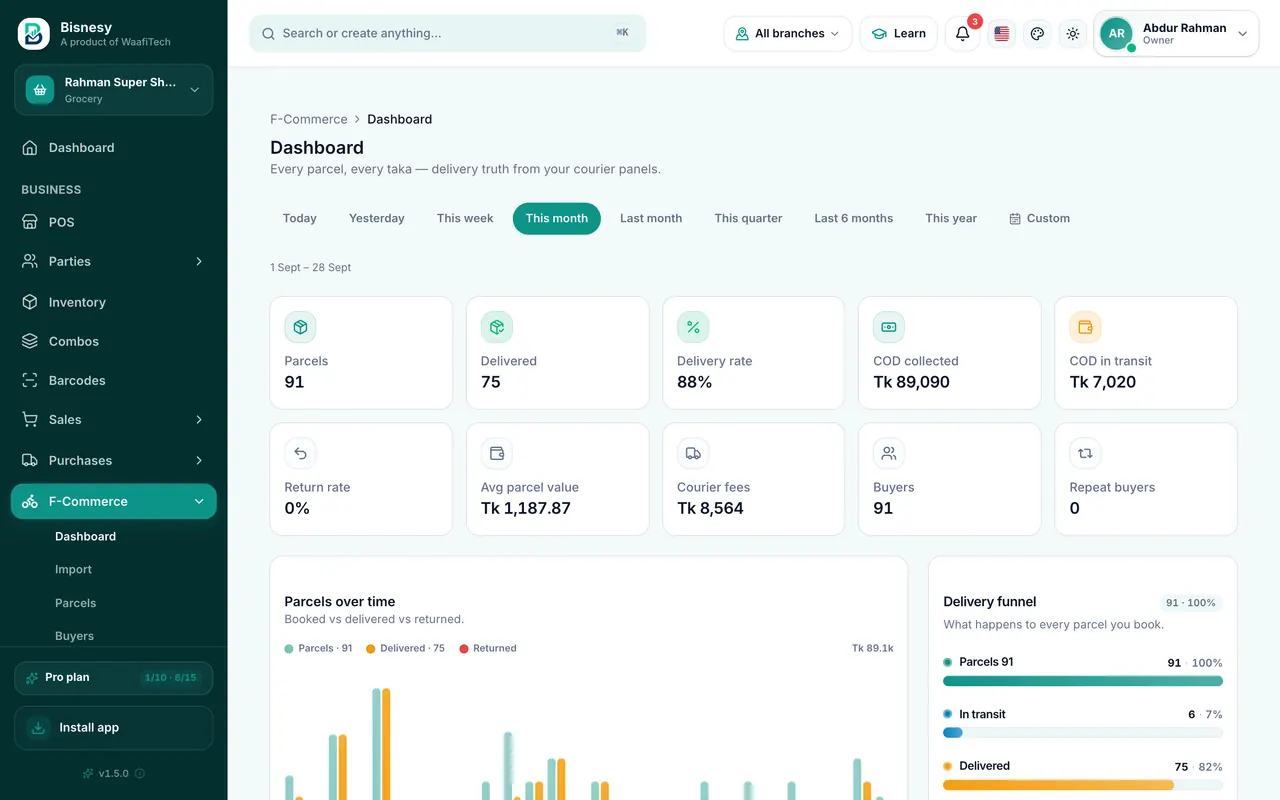
Waiting to send, on the way, delivered, returned and cash still to collect, in one list under Sales, next to the bill and the stock.
Other couriers by file
Using another courier? Import its parcel or parcel-list file and each line becomes an order with customer, amount and consignment number.
Built for
- Facebook page shops
- Online stores
- Wholesalers shipping to other districts
- Brands sending parcels daily
What Bisnesy doesn't do
Worth knowing before you choose.
- Direct booking and status updates are for Steadfast, Pathao and RedX, on the Pro plan.
- You use your own courier account and rates; Bisnesy does not collect COD.
Run a shop like yours before you decide
Open a demo shop that is already full of products, customers and dues. Make a sale, give credit, take a payment and watch the stock and the profit change. It is your own copy, and nothing you do in it can go wrong.
- Grocery
- Pharmacy
- Wholesale
- Clothing
- Footwear
- Mobile & electronics
- Hardware
- Online seller
- Agro inputs
Switch to Bisnesy without starting your business from zero
7 days of every Pro feature, and we set it up with you: your products imported, your opening stock and dues entered, a setup call in Bangla. No payment, no setup fee, and a 30-day money-back guarantee when you pay.
Setup requests go straight to our team in Dhaka on WhatsApp.
7 days of every Pro feature
POS, stock, accounting, HR and every report unlocked. No payment, nothing to install.
We import your products
Send your list on WhatsApp: an Excel file, an export from your old software, or a photo of your register. We load it for you.
We enter your opening stock & dues
Your current stock and what customers and suppliers owe, entered for you, so day one already looks like your shop.
A free setup call in Bangla
One call with our team to set up your invoice, staff and payment accounts and bill your first sale together.
30-day money-back guarantee, no questions asked
Tell us within 30 days of your first payment that it isn't working for you, and we refund it in full. No questions, no forms.
No setup fee, ever
Many business-software vendors charge a setup or licence fee up front. We don't. You pay only the plan, from ৳499 a month.
What happens if you start today
- 1Today
Open an account in two minutes. No payment, no payment.
- 2Day one
Send your product list on WhatsApp and we load it. We bill your first sale together.
- 37 days
Run every Pro feature in your own shop, no strings.
- 4Then
Pick a plan if it works for you. Not working within 30 days? Full refund, no questions asked.
Every day on paper is a day of dues and missing stock you never get back. Start today and tomorrow the whole picture is yours.
Money-back guarantee: within 30 days of your first payment, tell us Bisnesy isn't working for you and we refund that payment in full within 5 working days. No questions asked. One refund per account.
Questions people ask
Which couriers can I book directly?
Steadfast, Pathao and RedX, with your own account, on the Pro plan. Other couriers' parcel files can be imported.
Can I print courier labels for many orders at once?
Yes. Choose the parcels and print them together on a 4x6 roll, A6, or an A4 sheet of 4, 6, 8 or 10 labels.
Does delivery status update by itself?
Yes. Delivered, returned and cancelled come back from the courier, and a returned parcel goes back to stock.
Can I see how much COD the courier still owes me?
Yes. The courier desk lists the cash still to collect for each courier, next to the parcels it belongs to.
Keep reading
Try it on today's sales.
Create your account, add a handful of products and bill your next customer through Bisnesy. Seven days free, no payment, cancel any time.